

Mobile Betting Apps
Paripesa iOS App Download Guide for iPhone and iPad
Complete installation guide with screenshots and troubleshooting tips

Sports Betting Analyst & Football Predictions Expert
Brian Otieno is a Kenyan sports betting analyst with over 10 years of experience in football predictions, match analysis, and betting strategies. He specializes in European football leagues, statistical analysis, odds comparison, and identifying value betting opportunities. His approach combines data-driven insights, team performance research, and disciplined bankroll management to help sports enthusiasts make more informed betting decisions.
The Paripesa iOS app brings the full betting platform to iPhone and iPad users without requiring a browser. Apple's App Store policies around gambling apps have historically made this process less straightforward than on Android, but the current version installs cleanly on modern iOS versions. This guide walks through every installation method, covers system requirements, and addresses the common issues that trip people up.
Contents
- 1. App Store Installation Method
- 2. Direct Download from Paripesa Website
- 3. System Requirements and Compatibility
- 4. Account Setup After Installation
- 5. Sports Betting Features on Mobile
- 6. Casino Games in the iOS App
- 7. Deposits and Withdrawals on Mobile
- 8. Troubleshooting Common Issues
- 9. Security and Privacy Considerations
- 10. App Updates and Version Management
- 11. Comparison with Mobile Website
- 12. Regional Availability and Restrictions
- 13. Customer Support Access in the App
- 14. Final Assessment of Paripesa iOS App
Most users will find the App Store route simplest. Others prefer downloading directly from the Paripesa website, especially in regions where the App Store listing may be restricted or delayed. Both methods deliver the same app. The direct download uses Apple's enterprise distribution framework, which requires an extra trust step in Settings but otherwise functions identically.
Before starting, check that your device runs iOS 12.0 or later. The app supports iPhone 6s and newer, all iPad Pro models, iPad Air 2 and newer, iPad 5th generation and newer, and iPad mini 4 and newer. Storage requirement is modest — roughly 120 MB for the initial install, plus cache that grows with use. A stable internet connection is necessary for the download and for any betting activity afterward.
App Store Installation Method
Open the App Store on your iPhone or iPad. Tap the search icon and type "Paripesa" — the official app appears with the green and white logo. Verify the developer name reads "Paripesa" or the associated corporate entity to avoid lookalike apps. Tap Get, then authenticate with Face ID, Touch ID, or your Apple ID password. The download begins immediately.
Once installed, the app icon appears on your home screen. Launch it and you'll land on the login or registration screen. If you already have a Paripesa account, enter your credentials. New users can register directly in the app using phone number, email, or one-click registration. The App Store version updates automatically when you have automatic updates enabled, or you can update manually from the Updates tab.
Some regions may not show the app in search results due to local App Store restrictions. If searching yields no result, try changing your App Store region temporarily or use the direct download method described next. The app itself functions globally once installed — the restriction only affects discovery in the store.
Direct Download from Paripesa Website
Visit the official Paripesa website using Safari on your iOS device — other browsers may not trigger the install prompt correctly. Navigate to the mobile apps section, usually linked in the footer or main menu. Tap the iOS download button. A system dialog will appear asking to allow "paripesa.com" to install an app. Tap Allow.
After the download completes, the app icon appears on your home screen but won't launch immediately. You'll see an "Untrusted Enterprise Developer" message if you try. Go to Settings > General > VPN & Device Management (or Profiles & Device Management on older iOS). Find the Paripesa profile under Enterprise App, tap it, then tap Trust. Confirm the trust action. The app now launches normally.
This method bypasses App Store review cycles, so you always get the latest version directly from Paripesa. Updates work similarly — revisit the website, download the new version, and it overwrites the old one. The trust setting persists across updates unless Apple revokes the enterprise certificate, which happens rarely but requires repeating the trust step.
Enterprise certificates occasionally expire or get revoked by Apple. If the app suddenly refuses to open with a certificate error, delete the app, revisit the website, and download a fresh build with a renewed certificate. This is a known limitation of enterprise distribution compared to App Store apps, which never face certificate revocation.
System Requirements and Compatibility
The app runs on iOS 12.0 and above. That covers devices released since 2015. Performance scales with hardware — newer iPhones handle live betting animations and casino games more smoothly. The app is universal, meaning one binary works on both iPhone and iPad, adapting its layout to screen size. iPad users get a two-pane layout in landscape that shows navigation alongside content.
Minimum free storage: 200 MB recommended to accommodate cache, especially if you play casino games with heavy graphics. The app caches thumbnails, game assets, and live stream data. You can clear cache from the app settings without losing login credentials or preferences. Background app refresh should be enabled for timely notifications about bet results, promotions, and live score updates.
Scroll horizontally to see all columns
| Device Family | Minimum Model | iOS Version |
|---|---|---|
| iPhone | iPhone 6s | iOS 12.0 |
| iPad Pro | All models | iOS 12.0 |
| iPad Air | iPad Air 2 | iOS 12.0 |
| iPad | 5th generation | iOS 12.0 |
| iPad mini | iPad mini 4 | iOS 12.0 |
The app does not support jailbroken devices reliably. Some security checks may prevent launch or cause crashes on modified iOS. If you use a jailbroken device, the App Store version may work better than the enterprise build, but neither is officially supported. Standard, non-jailbroken iOS provides the most stable experience.
Account Setup After Installation
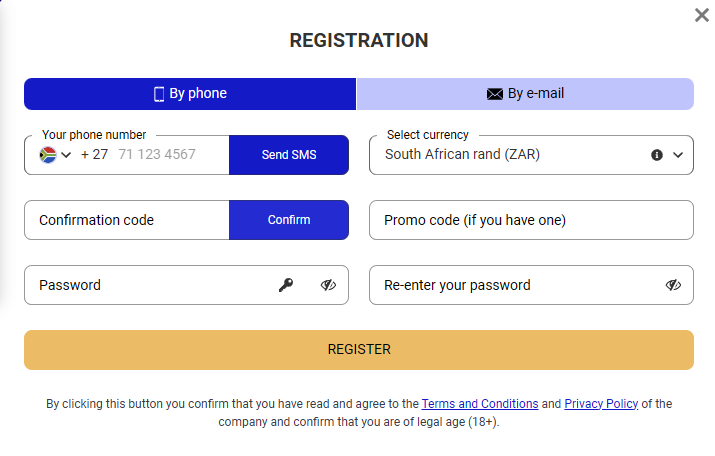
First launch presents three options: Login, Registration, and Guest Mode. Guest Mode lets you browse odds and casino games without an account but blocks betting, deposits, and withdrawals. Registration takes under a minute. Choose phone, email, or one-click. Phone registration sends an SMS code. Email sends a verification link. One-click generates a temporary account ID and password you should save immediately.
After registration, the app prompts for a first deposit to claim the welcome bonus. The bonus structure varies by region but typically matches your first deposit up to a capped amount with wagering requirements. Read the terms before depositing — some payment methods may be excluded from bonus eligibility. The app shows available payment methods for your detected country automatically.
Existing users log in with their ID or email and password. Face ID and Touch ID can be enabled in the app's security settings for faster subsequent logins. Two-factor authentication via SMS or Google Authenticator adds a layer of security and is recommended for accounts with significant balances. The app remembers your session for 30 days by default, adjustable in settings.
Sports Betting Features on Mobile
The sportsbook mirrors the desktop experience. The home screen shows popular live events, upcoming matches, and quick links to major leagues. Swipe between Live, Prematch, and Favorites tabs. Tap any event to expand markets — match winner, totals, handicaps, both teams to score, correct score, half-time/full-time, and dozens of player props for major sports.
The bet slip slides up from the bottom. Add multiple selections for accumulators. The app calculates combined odds and potential returns in real time. One-click bet feature places a preset stake on a single tap — configurable in settings. Cash out appears on the bet slip for eligible bets, showing the current offer. Accept or let it ride. Live streaming is available for select events; a play icon indicates streams. Video quality adapts to connection speed.
- 40+ sports covered including niche markets
- Live betting with dynamic odds updates
- Cash out on singles and accumulators
- Bet builder for custom match combinations
- Live streaming for football, tennis, basketball
- Statistics and match tracker for live events
- Favorites star to pin leagues and teams
The search function finds teams, players, or tournaments instantly. Type a few letters and results appear grouped by sport. Virtual sports and esports have dedicated sections accessible from the main sports menu. Virtual events run 24/7 with results every few minutes. Esports covers CS2, Dota 2, League of Legends, Valorant, and others with live betting markets.
Casino Games in the iOS App
The casino tab loads a lobby organized by provider and game type. Slots dominate the catalog — thousands of titles from NetEnt, Pragmatic Play, Play'n GO, Microgaming, and dozens more. Filter by provider, features (megaways, bonus buy, jackpots), or search by name. Games launch in a full-screen WebView wrapper that handles touch controls natively. Landscape locks automatically for most slots.
Live casino streams from Evolution, Pragmatic Play Live, Ezugi, and others. Tables include roulette, blackjack, baccarat, poker variants, and game shows like Crazy Time and Monopoly Live. Video quality settings let you balance data usage and clarity. Chat with dealers and other players via the in-game interface. Bet limits range from a few cents to thousands per hand depending on the table.
Instant games and crash games have their own section. Aviator, JetX, Mines, Plinko, Dice, and similar titles load quickly and work well with touch. The provably fair verification link is accessible from each game menu. Jackpot games show current prize pools in real time. Demo mode is available for most slots and table games — tap "Play for Fun" instead of "Play for Real" to test without risking balance.
Scroll horizontally to see all columns
| Category | Providers | Demo Mode |
|---|---|---|
| Slots | 50+ | Yes |
| Live Casino | 10+ | No |
| Table Games | 15+ | Yes |
| Crash Games | 8+ | Yes |
| Jackpots | 20+ | No |
| TV Games | 5+ | No |
Deposits and Withdrawals on Mobile
The cashier integrates payment methods relevant to your registered country. Common options include Visa, Mastercard, UPI, Paytm, PhonePe, Google Pay, Pix, M-Pesa, Perfect Money, bank transfer, and cryptocurrencies (Bitcoin, USDT, Ethereum, Litecoin, others). Minimum deposit is typically 1 USD or local equivalent. Most methods credit instantly. Card deposits may require 3D Secure authentication, which opens a bank page within the app.
Withdrawals use the same methods where possible. First withdrawal requires identity verification — upload a photo ID and proof of address in the verification section. The app guides you through the document upload with camera integration. Processing times vary: e-wallets and crypto often complete within 15 minutes; cards and bank transfers take 1-5 business days. Withdrawal limits depend on VIP level and method.
The app shows pending, approved, and rejected transactions in the history tab. Failed deposits usually indicate insufficient funds, bank decline, or temporary gateway issues. Retry or switch methods. Withdrawal rejections typically stem from unverified accounts, bonus wagering not met, or mismatched payment details. Support chat is accessible from the cashier screen for immediate help.
Troubleshooting Common Issues
App won't install from website: Ensure you're using Safari, not Chrome or Firefox. Check Settings > General > VPN & Device Management for an existing Paripesa profile — remove it first if present. Restart the device, then retry the download. If the install button stays grayed out, the enterprise certificate may be revoked; wait for Paripesa to renew it or use the App Store version.
App crashes on launch: Force close from the app switcher and reopen. If it persists, delete and reinstall. Check for iOS updates — older versions may lack required frameworks. Low storage can also cause crashes; free up space and try again. Jailbroken devices often trigger anti-tamper checks that crash the app.
Live streams don't play: Verify you have a funded account or placed a bet in the last 24 hours — some streams require this. Switch between Wi-Fi and cellular to rule out network restrictions. Close other apps using bandwidth. The stream quality selector (gear icon) lets you drop to a lower bitrate if buffering persists.
- Install fails: use Safari, check certificate trust, restart device
- Crashes on open: reinstall, update iOS, free storage
- Streams buffer: lower quality, check account funding, switch network
- Login fails: reset password, check 2FA time sync, contact support
- Deposit stuck: wait 10 minutes, check transaction history, contact support
- Withdrawal delayed: verify KYC complete, check method limits, contact support
Push notifications not arriving: Check Settings > Notifications > Paripesa > Allow Notifications. Inside the app, go to Settings > Notifications and enable the categories you want — bet results, promotions, live score updates, bonus offers. iOS may throttle notifications for apps you rarely open; opening the app regularly keeps the priority high.
Security and Privacy Considerations
The app uses TLS 1.2+ for all network traffic. Login credentials are never stored in plaintext — only encrypted tokens. Face ID and Touch ID authentication uses the Secure Enclave; biometric data never leaves the device. The enterprise version and App Store version have identical security implementations. Paripesa holds a Curacao license, which mandates basic player protection standards but does not equate to UKGC or MGA oversight.
Data collection follows the privacy policy available in the app and on the website. The app collects device identifiers, IP address, betting history, and transaction records for regulatory compliance and fraud prevention. Location data is used only to verify eligibility in restricted jurisdictions — you can deny the permission, but the app may block access from prohibited regions. Marketing communications are opt-in and manageable in account settings.
Responsible gambling tools are built in: deposit limits (daily, weekly, monthly), loss limits, session time limits, self-exclusion periods from 24 hours to permanent, and reality check reminders. Access them from the profile menu. The app also links to external help organizations. These tools apply across all platforms — limits set on mobile sync to desktop and vice versa.
App Updates and Version Management
App Store updates follow Apple's review schedule — typically 24-48 hours after Paripesa submits. Enable automatic updates in Settings > App Store > App Updates for hands-off maintenance. Manual updates appear in the App Store Updates tab. The direct download version updates when you revisit the website and download the latest .ipa. The app checks for updates on launch and prompts if a new version is available.
Version numbers follow semantic versioning. Major updates (x.0.0) bring UI overhauls or new features. Minor updates (x.y.0) add smaller features or payment methods. Patch updates (x.y.z) fix bugs and security issues. The changelog is viewable in the App Store listing or the app's About screen. Enterprise builds show the build date instead of a version number in some cases.
Rolling back to a previous version is not supported on iOS. If an update introduces a critical bug, the only recourse is waiting for a hotfix or contacting support. This applies to both distribution methods. Android users can sideload older APKs, but iOS does not allow downgrades without a full device restore from backup.
The enterprise distribution model trades App Store oversight for faster updates. Most users won't notice the difference until a certificate expires.
Comparison with Mobile Website
The mobile website at paripesa.com works in any browser and requires no installation. It offers near-feature parity — sportsbook, casino, cashier, support. The app loads faster after first launch because assets are cached locally. Push notifications only work via the app. Face ID/Touch ID login is app-only. The website may be preferable if you switch devices frequently or cannot install apps due to device management policies.
Scroll horizontally to see all columns
| Feature | iOS App | Mobile Website |
|---|---|---|
| Installation required | Yes | No |
| Push notifications | Yes | No |
| Biometric login | Yes | No |
| Offline caching | Partial | No |
| Auto updates | App Store only | Always current |
| Storage used | ~120 MB + cache | Minimal |
| Certificate issues | Enterprise only | Never |
Performance-wise, the app feels snappier for navigation between sections. The website reloads assets on each page transition unless heavily cached by the browser. For live betting where seconds matter, the app's persistent connection and local state management provide an edge. Casino games run identically since both use the same game server iframes.
Regional Availability and Restrictions
Paripesa operates in dozens of countries across Africa, Asia, Latin America, and CIS regions. The app detects your location via IP and GPS (if permitted) to show relevant payment methods, bonuses, and sports markets. Some countries block gambling domains at the ISP level. The app may still connect if the API endpoints differ from the main domain, but this varies. VPN use violates terms of service and can lead to account closure if detected.
App Store availability mirrors local gambling regulations. In countries where online betting is prohibited, the app will not appear in search results even with the correct Apple ID region. The direct download method may still work if the website is accessible, but payment processing will likely fail for local banks. Always verify the legal status in your jurisdiction before depositing.
- India: UPI, Paytm, PhonePe, crypto supported
- Nigeria: Bank transfer, USSD, OPay, Palmpay
- Kenya: M-Pesa, Airtel Money, bank cards
- Brazil: Pix, Boleto, bank transfer, crypto
- Bangladesh: bKash, Nagad, Rocket, crypto
- Turkey: Papara, crypto, bank transfer
- Indonesia: Dana, OVO, GoPay, bank transfer
Language support in the app includes English, Hindi, Portuguese, Spanish, Turkish, Indonesian, Vietnamese, Thai, Arabic, and several African languages. The app defaults to your device language if supported, otherwise English. Change it in Settings > Language. Customer support chat operates in major languages; less common languages may route to English-speaking agents with translation assistance.
Customer Support Access in the App
The support button opens a live chat widget staffed 24/7. Typical response time is under two minutes for English. Other languages may queue longer. The chat supports file uploads — useful for sending KYC documents or screenshots of errors. Chat history persists across sessions. Email support is available for non-urgent issues; the address is in the help section. No phone support is offered.
The help center covers account verification, bonus terms, payment methods, betting rules, and technical FAQs. Articles are searchable and categorized. Most common issues resolve without contacting support. The app also includes a "Report a Problem" feature that captures device info, app version, and a screenshot automatically — attach a description and send directly to the technical team.
Telegram and WhatsApp support channels exist for some regions. Links are in the app's contact section. These are unofficial but monitored by the same support team. Response times vary. For account security issues — unauthorized access, compromised credentials — use live chat immediately and request a security freeze.
Live chat in the app is the fastest resolution path. Email adds 12-24 hours. Social channels are inconsistent.
Final Assessment of Paripesa iOS App
The Paripesa iOS app delivers a complete betting experience with few compromises. Installation is straightforward via the App Store for most users; the direct download fills gaps where App Store restrictions apply. The enterprise certificate trust step is a minor friction point but manageable. Feature parity with desktop is strong — sportsbook, live betting, casino, live casino, cashier, and support all work well on touch screens.
Performance is solid on supported devices. The app stays responsive during live odds updates and handles multiple open bet slips without lag. Casino games load at speeds comparable to desktop. Battery drain is moderate — expect 10-15% per hour of active betting with screen on. Data usage is low for sports betting; casino games and live streams consume more.
The main drawbacks are the enterprise certificate renewal cycle (occasional reinstall required) and the lack of support for jailbroken devices. Neither affects standard users on current iOS. The App Store version avoids certificate issues entirely but may lag behind on updates by a day or two. Choose the distribution method that matches your priority: convenience (App Store) or immediacy (direct download).
Frequently Asked Questions
Is the Paripesa iOS app free to download?
Yes, the app is free on both the App Store and the Paripesa website. No purchase or subscription is required.
Why does the direct download ask me to trust a developer profile?
The direct download uses Apple's enterprise distribution, which requires manual trust in Settings > General > VPN & Device Management. This is normal for apps not distributed through the App Store.
Can I use the same account on the app and desktop?
Yes, your account syncs across all platforms. Login credentials, balance, bonuses, and betting history are shared.
What iOS version do I need at minimum?
iOS 12.0 or later. This covers iPhone 6s and newer, iPad Air 2 and newer, iPad 5th generation and newer, and iPad mini 4 and newer.
The app won't open after an iOS update. What should I do?
Delete the app and reinstall from your original source (App Store or website). iOS updates occasionally invalidate enterprise certificates or cached data.
Are all payment methods available in the iOS app?
Yes, the cashier shows the same methods as desktop for your registered country. Some methods may redirect to a browser for authentication (e.g., 3D Secure for cards).
How do I enable push notifications for bet results?
Go to iOS Settings > Notifications > Paripesa > Allow Notifications. Then in the app, open Settings > Notifications and enable the categories you want.
Is the app safe for banking transactions?
The app uses TLS encryption for all traffic. Biometric login uses the device Secure Enclave. Enable two-factor authentication in Account Settings for maximum protection.