

Betting Guides
Paripesa Registration: Complete Account Setup Guide
Learn how to register on Paripesa via website, mobile app, or one-click methods with detailed screenshots.

Sports Betting Analyst & Football Predictions Expert
Brian Otieno is a Kenyan sports betting analyst with over 10 years of experience in football predictions, match analysis, and betting strategies. He specializes in European football leagues, statistical analysis, odds comparison, and identifying value betting opportunities. His approach combines data-driven insights, team performance research, and disciplined bankroll management to help sports enthusiasts make more informed betting decisions.
Creating an account with Paripesa takes only a few minutes, but the platform offers several different registration paths depending on how much information you want to provide upfront. This guide walks through every method available in 2024, explains what happens after you submit your details, and covers the verification steps that unlock full account functionality including withdrawals.
Contents
- 1. Why Register with Paripesa
- 2. Registration Methods Overview
- 2.1. One-Click Registration Process
- 2.2. Phone Number Registration Steps
- 2.3. Email Registration Details
- 2.4. Social Media Registration Option
- 3. Mobile App Registration Guide
- 4. Account Verification Requirements
- 5. Welcome Bonus Activation
- 6. Common Registration Issues
- 7. Login After Registration
- 8. Account Security Best Practices
- 9. Depositing After Registration
- 10. Regional Registration Differences
- 11. Troubleshooting Verification Delays
- 12. Final Assessment of Paripesa Registration
Paripesa operates under a Curacao license and serves customers across Africa, Asia, Latin America, and parts of Europe. The registration process is largely consistent across regions, though some countries see slightly different payment options or bonus structures. If you're accessing the site from a restricted jurisdiction, you may encounter a mirror link or be redirected to a regional version — the core signup flow remains the same.
Before starting, decide whether you want to register via the desktop website, the mobile site, or the dedicated Android and iOS apps. The steps are nearly identical, but the app offers biometric login setup immediately after registration, which can save time later. Have a valid phone number or email address ready, plus a password you haven't used elsewhere.
Why Register with Paripesa
The platform combines a sportsbook with over 1,000 daily events, a casino section featuring thousands of slots and live dealer tables, plus virtual sports, TV games, and crash games like Aviator. New accounts qualify for a welcome package that can reach 100% on the first deposit up to a generous limit, plus additional bonuses on subsequent deposits. The loyalty program awards points for every bet placed, which convert to cash or free bets at tiered rates.
Payment flexibility is another reason users choose Paripesa. The cashier supports UPI, Paytm, PhonePe, and GPay for Indian customers; M-Pesa, Airtel Money, and MTN Mobile Money across Africa; Pix in Brazil; and a wide range of cryptocurrencies including USDT, Bitcoin, Ethereum, and Litecoin. Minimum deposits start around $1 or equivalent, and withdrawals process through most of the same channels.
The interface supports over 50 languages and dozens of currencies. Odds formats include decimal, fractional, American, Hong Kong, Indonesian, and Malaysian. If you bet on cricket, football, tennis, or esports, the market depth is comparable to larger European brands. Live streaming covers select events for logged-in users with funded accounts or recent bets.
Registration Methods Overview
Paripesa offers four primary registration methods: one-click, by phone, by email, and through social networks. Each creates a functional account, but the amount of personal data required upfront differs. One-click is fastest but requires you to complete your profile before withdrawing. Phone and email registration build in a verification step immediately. Social login pulls basic profile data from Google, Telegram, or other supported platforms.
All methods ask you to select a currency and confirm you're over 18. The welcome bonus opt-in appears during registration — check the box if you want the sports or casino package. You can also enter a promo code at this stage if you have one. After submitting, you receive an account ID (a numeric string) and, depending on the method, a password. Save both immediately; the ID serves as your username for login.
One-click registration lives up to its name. Click the button, pick your currency, confirm the age checkbox, and the system generates an account ID and password instantly. No email or phone verification happens at this point. You land directly in your account dashboard with a prompt to complete your profile. This method suits users who want to explore the platform before committing personal details.
One-Click Registration Process
Start on the homepage and click the yellow Registration button in the top right. Select the One-Click tab — it's usually the default. Choose your country and currency from the dropdowns. The country field may auto-detect based on your IP. Tick the box confirming you're 18+ and agree to the terms. If you have a promo code, expand the field and enter it. Click Register.
A popup appears with your new account ID and a generated password. Copy both to a secure location. The popup also offers to send the credentials to your email if you provide one — this is optional but recommended. Once you close the popup, you're logged in. A banner at the top reminds you to complete your profile: add a phone number, email, full name, and date of birth. Until you do, withdrawals remain blocked.
The generated password is a random string of characters. Change it immediately under Account Settings > Security. While you're there, enable two-factor authentication via SMS or Google Authenticator. One-click accounts are convenient but slightly more vulnerable if someone gains access to your device, since no email or phone is tied to the account yet.
Phone Number Registration Steps
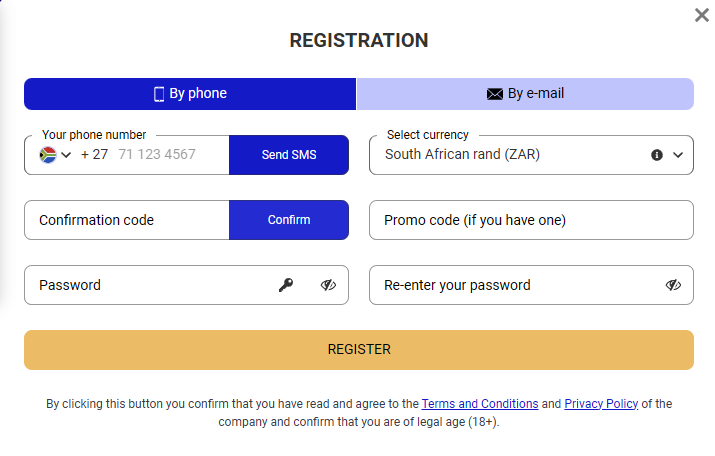
Phone registration adds a verification layer from the start. Select the By Phone tab. Enter your mobile number in international format — the country code dropdown helps avoid mistakes. Choose your currency. Create a password meeting the requirements: at least 8 characters, one uppercase letter, one number, and one special character. Tick the age and terms boxes. Enter a promo code if applicable. Click Send SMS.
A 4-6 digit code arrives via SMS within 30 seconds. Enter it in the verification field and confirm. The account creates immediately with your phone number as the primary contact. You receive your account ID on screen and via SMS. The password you created becomes your login credential. No further verification is needed to deposit or bet, but you'll still need to add your full name and date of birth in the profile section before requesting a withdrawal.
If the SMS doesn't arrive, wait a minute and click Resend Code. Check that your number accepts international messages — some carriers block short codes. The Call Me Instead option triggers an automated voice call with the code, useful if SMS delivery is unreliable in your region. After three failed attempts, the system locks the number for 15 minutes.
Email Registration Details
Email registration mirrors the phone flow but uses an inbox verification link instead of an SMS code. Select the By Email tab. Fill in your email address, choose a currency, create a strong password, and confirm age and terms. Click Register. Check your inbox — and spam folder — for a message from Paripesa with the subject line containing your account ID and a verification link.
Click the link to activate the account. The link expires after 24 hours. Once verified, you're redirected to the site logged in. Your email becomes the primary recovery method for password resets and security notifications. As with phone registration, you must still complete the profile with your legal name and date of birth before withdrawals are permitted.
Email registration works well for users who prefer not to link a phone number or who manage multiple accounts across devices. The verification link also serves as proof of email ownership, which support may request if you ever need to recover a locked account. Use an email you check regularly and secure with its own 2FA.
Social Media Registration Option
The social login method connects your Paripesa account to Google, Telegram, VK, OK.ru, Yandex, or Mail.ru. Click the corresponding icon on the registration screen. A popup requests permission to access your public profile — typically name, email, and profile photo. Grant access, choose your currency, confirm age and terms, and the account creates instantly with the email from your social profile as the contact.
This method skips password creation initially; you log in via the social provider each time. However, Paripesa still assigns an account ID and generates a password you can view and change in Account Settings. Setting a native password is advisable so you can log in directly if the social provider has an outage. The profile auto-fills with your name from the social account, but you must still add your date of birth manually.
Social registration is fastest for users already logged into Google or Telegram on the device. The downside is dependency on a third-party auth system. If you lose access to that Google account or Telegram number, recovering the Paripesa account requires contacting support with ID documents. For this reason, adding a backup phone number and native password soon after registration is a smart move.
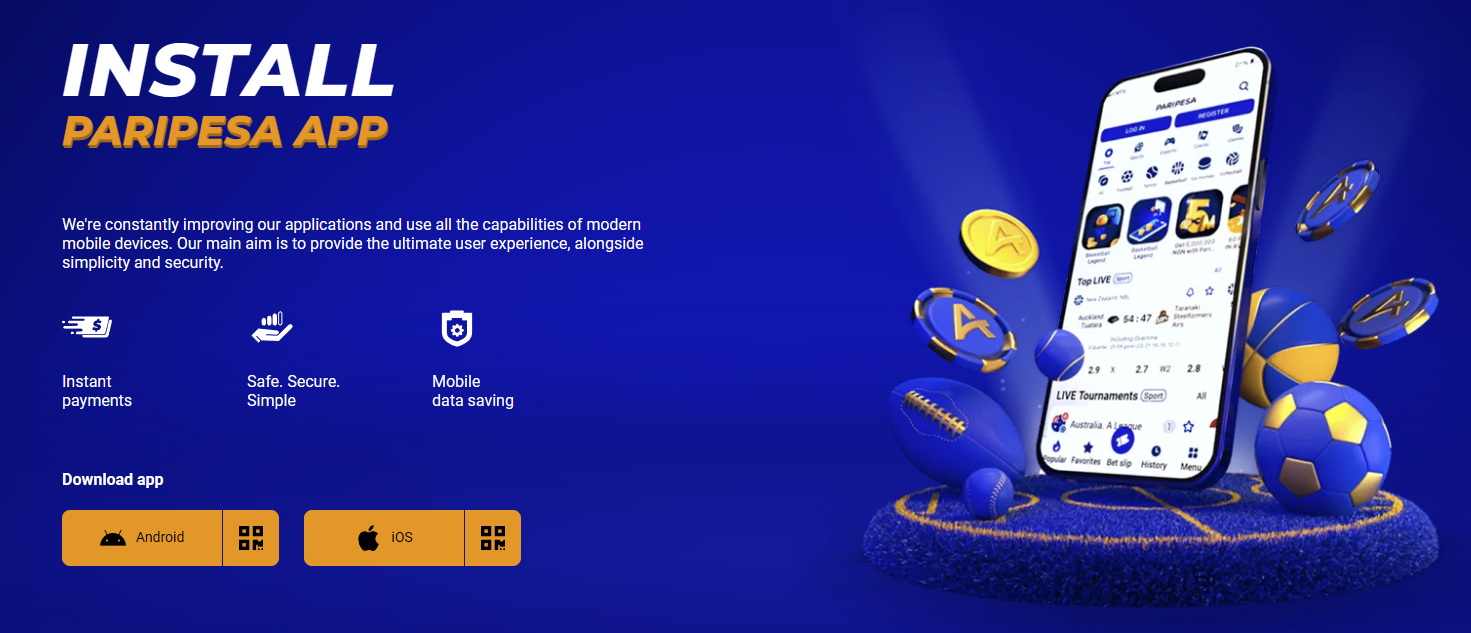
The Paripesa mobile app for Android and iOS replicates every registration method described above. Download the APK from the official site for Android — Google Play doesn't host real-money betting apps in most regions. iOS users get the app via the App Store in supported countries or through a direct link on the Paripesa website. The app icon and interface language match your device settings by default.
Mobile App Registration Guide
Open the app and tap Register. The same four tabs appear: One-Click, Phone, Email, Social. The layout stacks vertically for thumb navigation. Phone and email fields include country code pickers with search. The password field toggles visibility with an eye icon. Promo code entry sits under an expandable section. After submitting, the app may request permission to send notifications — enable this for bet updates, bonus alerts, and withdrawal confirmations.
A notable app-only feature: after phone or email verification, you're prompted to set up Face ID, Touch ID, or fingerprint login. This replaces password entry for future sessions. The biometric data stays on your device; Paripesa only receives a token confirming successful authentication. If you skip this step, you can enable it later under Security Settings.
The app also offers a "Remember me" toggle on the login screen. With biometrics enabled, this keeps you logged in indefinitely unless you manually log out or the app detects a security event like a password change from another device. For shared devices, disable Remember me and rely on biometrics alone.
Android users installing the APK must enable "Install from unknown sources" for the browser or file manager used to download. The setting reverts automatically after installation on Android 12+. The APK file is around 60 MB. Updates push through the app itself — you'll see a banner when a new version is ready. iOS updates come through the App Store or TestFlight for beta builds.
Account Verification Requirements
Paripesa follows standard KYC (Know Your Customer) procedures. Verification isn't required to deposit or place bets, but it becomes mandatory before your first withdrawal. The process has two tiers: basic profile completion and full document verification. Basic completion means filling in your first name, last name, date of birth, and residential address in the Personal Data section. This takes a minute and unlocks the withdrawal request button.
Full verification requires uploading a government-issued photo ID (passport, driver's license, or national ID card) and a proof of address document (utility bill, bank statement, or government letter) dated within the last three months. The documents must show your full name matching the profile, and the address must match your registered address. Upload clear photos or scans — blurry images get rejected.
In some regions, Paripesa may request a selfie holding your ID next to your face, or a video verification call. These extra steps typically trigger for large withdrawals, suspicious login patterns, or when the automated system flags a discrepancy. The verification team usually reviews submissions within 24 hours. You'll receive an email and in-app notification once approved or if additional documents are needed.
If your documents are rejected, the notification specifies why: expired ID, mismatched name, address older than three months, or poor image quality. Fix the issue and re-upload. There's no limit on attempts, but repeated rejections may flag the account for manual review, adding days to the process. Keep digital copies of your ID and a recent utility bill handy for quick resubmission.
Welcome Bonus Activation
The welcome bonus opt-in appears during registration as a checkbox labeled "I want to receive the welcome bonus." Two packages exist: Sports (100% on first deposit up to a capped amount) and Casino (a multi-deposit package with free spins). You can only choose one. The sports bonus carries a 5x wagering requirement on accumulator bets with at least three selections at odds of 1.40 or higher. The casino bonus typically requires 35x wagering on eligible slots.
If you miss the checkbox during signup, you can still claim the bonus on your first deposit by selecting it in the deposit popup. However, some regions restrict this to the registration moment only. Check the Promotions page for current terms — bonus amounts and wagering rules change periodically. The bonus code field during registration is for partner codes; the standard welcome offer doesn't require a code.
Minimum deposit to trigger the bonus varies by currency but is generally around $1 or equivalent. Maximum bonus caps differ by country — Indian users might see up to ₹26,000, while Nigerian users see up to ₦100,000. The bonus funds land in a separate bonus balance and convert to real money only after meeting wagering requirements. You can track progress in the Bonuses section of your account.

A second deposit bonus often follows the first, offering 50% up to a lower cap. Third and fourth deposit bonuses may exist depending on the current promotion calendar. Each has its own wagering terms. Free spins from the casino package are credited in batches over several days and must be used on specific slots — usually popular titles from providers like Pragmatic Play, NetEnt, or Playson.
Common Registration Issues
The most frequent problem is not receiving the SMS or email verification code. For SMS, ensure your number isn't on a do-not-disturb registry and that international messages aren't blocked. Try the Call Me Instead option. For email, check spam, promotions, and junk folders. Whitelist @paripesa.com or the specific sender address. If using a corporate or university email, the IT department may block external automated messages.
Another issue: the registration button does nothing or spins indefinitely. This usually indicates a browser cache problem, an ad blocker interfering with scripts, or a temporary server hiccup. Clear cache and cookies, disable extensions, or try a different browser. The mobile site often works when the desktop version stalls. If the problem persists, the platform may be undergoing maintenance — check Paripesa's Telegram channel or Twitter for status updates.
Duplicate account errors occur if you've previously registered with the same phone, email, or IP address. Paripesa allows one account per person. If you forgot an old account, use the password reset flow instead of creating a new one. Creating multiple accounts violates terms and can lead to all accounts being frozen with funds held pending investigation. Contact support if you genuinely lost access to an old account — they can merge or recover it after identity verification.
Password rejection during creation often stems from not meeting complexity rules. The password must be at least 8 characters with uppercase, lowercase, number, and special character. Avoid common patterns like Password123! or Paripesa2024!. The system checks against leaked password databases. Use a password manager to generate and store a unique credential. If you paste a generated password and it's rejected, type it manually — some clipboard managers add invisible characters.
Login After Registration
Once registered, you log in using your account ID (the numeric string) or your registered email/phone, plus your password. The login form accepts any of these identifiers interchangeably. If you enabled 2FA, a code arrives via SMS or your authenticator app after the password step. The app's biometric login bypasses both password and 2FA on trusted devices.
Forgot password? Click the reset link on the login screen. Enter your account ID, email, or phone. A reset link or code goes to the registered contact. The link expires in 1 hour. Set a new password meeting the same complexity rules. If you no longer have access to the registered email or phone, contact support — they'll verify your identity with documents before updating the contact details.
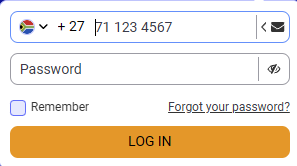
The "Remember me" checkbox on the login page sets a persistent cookie valid for 30 days on that browser. Combined with 2FA, this means you enter the 2FA code only once per month per device. Without 2FA, Remember me keeps you logged in with just the password. For security, avoid Remember me on shared or public computers. Always log out manually when finished.
Account Security Best Practices
Enable two-factor authentication immediately after registration. SMS 2FA is convenient but vulnerable to SIM swap attacks. Google Authenticator, Authy, or Microsoft Authenticator generate time-based codes offline and are significantly more secure. In Account Settings > Security, you can enable both methods and choose which is primary. Backup codes generate a set of one-time codes — save these in a password manager or printed in a safe place.
Set a withdrawal PIN in the same security section. This 4-digit code is required for every withdrawal request, adding a layer of protection if someone accesses your logged-in session. Choose a PIN unrelated to your birth year, phone suffix, or other guessable numbers. The PIN can be changed anytime but requires the current PIN or 2FA confirmation.
Review active sessions periodically. The Security page lists every device and browser currently logged into your account, with location, IP, and last activity. Revoke any session you don't recognize. This also logs out potential unauthorized access immediately. Enable login notifications via email or Telegram to receive alerts for new sign-ins.
Depositing After Registration
With registration complete and the welcome bonus opted in, your first deposit activates the offer. Click the Deposit button — prominent in the header and dashboard. The cashier displays methods filtered by your registered country. Popular options include UPI apps for India, M-Pesa for Kenya, Pix for Brazil, and crypto wallets globally. Minimum deposits are low, often $1 or equivalent, but the bonus may require a higher minimum — check the terms.
Select a method, enter the amount, and confirm. Most digital methods (UPI, mobile money, crypto) credit instantly. Bank transfers can take 1-3 business days. The deposit screen shows any fees — Paripesa generally doesn't charge deposit fees, but payment providers might. The bonus credits automatically if you opted in. If it doesn't appear, contact live chat with the transaction ID; they can manually apply it if the deposit qualified.
After the first deposit, the account is fully functional for betting and casino play. Withdrawals remain locked until profile completion and verification, but you can explore markets, try slots in demo mode, and place real-money bets. The account dashboard shows your real balance, bonus balance, and wagering progress separately. Switch between them in the bet slip when placing accumulator bets for the sports bonus rollover.
Regional Registration Differences
While the core registration flow is identical, some regions see variations. Indian users often encounter a streamlined UPI verification step where a ₹1 transaction confirms the payment method during signup. African users may see mobile money integration that pre-fills the phone number from the SIM card. Brazilian users get Pix key registration as an option. European users in restricted countries may only access mirror domains with slightly different branding.
Currency selection at registration determines your account's base currency. This cannot be changed later without contacting support and potentially closing the account. Choose the currency you'll actually deposit and withdraw in to avoid conversion fees. If you're in a country with high inflation, consider registering in USD or EUR if available, though local currency may offer more convenient payment methods.
Language preference sets during registration based on browser or app language but can be changed anytime in the header dropdown. The site supports right-to-left languages like Arabic and Hebrew with full interface mirroring. Customer support availability varies by language — English, Hindi, Portuguese, Spanish, and Russian typically have 24/7 live chat. Other languages may have limited hours or email-only support.
Troubleshooting Verification Delays
If your verification sits in pending for more than 48 hours, first check the email associated with the account for requests for additional documents. The verification team sometimes asks for a specific document type — for example, a bank statement showing the deposit transaction if the address document is a utility bill in a landlord's name. Reply directly to that email with the requested file attached.
If no email arrived, open a live chat session. Provide your account ID and ask for a verification status update. Agents can see the review queue position and often expedite straightforward cases. Have your documents ready to re-upload if the agent identifies an issue. The chat transcript serves as a record if you need to escalate.
In rare cases, verification triggers a security review due to matched data with a previously closed account, suspicious IP patterns, or document authenticity concerns. These reviews can take 5-10 business days. The account remains functional for betting but withdrawals stay blocked. Paripesa doesn't disclose specific security algorithms, but consistent, legitimate play from a single device and IP reduces false positives.
Final Assessment of Paripesa Registration
Paripesa's registration system balances speed and flexibility. The one-click option genuinely works for immediate exploration, while phone and email methods build in security from the start. Social login adds convenience for users comfortable linking accounts. The mandatory profile completion before withdrawal is a reasonable KYC approach — it doesn't block the betting experience but ensures compliance when money leaves the platform.
The mobile app registration flow is well-executed, with biometric setup integrated naturally. Document verification typically completes within hours, not days, which puts Paripesa ahead of many competitors in the same licensing tier. The welcome bonus opt-in during registration is clear, and the terms are accessible without hunting through footers. For a new user, the path from landing on the homepage to placing a funded bet takes under five minutes if you have your phone or email ready.
Areas for improvement: the generated password for one-click accounts is hard to copy on mobile without the email-forward option, and the account ID (a long number) isn't memorable — most users end up logging in with email or phone anyway. The verification document upload could accept more file formats; currently it prefers JPG/PNG/PDF and rejects HEIC from iPhones without conversion. These are minor friction points in an otherwise smooth process.
Frequently Asked Questions
Can I register multiple Paripesa accounts with different emails?
No. Paripesa allows one account per person. Creating multiple accounts violates the terms of service and can result in all accounts being frozen with funds held during investigation.
Do I need to verify my account before depositing?
No. You can deposit and bet immediately after registration. Verification is only required before your first withdrawal request.
What if I don't receive the SMS verification code?
Wait 60 seconds and click Resend Code. If it still doesn't arrive, use the Call Me Instead option for an automated voice call with the code. Ensure your number accepts international messages.
Can I change my account currency after registration?
Generally no. The base currency is set during registration and cannot be changed in the account settings. Contact support for exceptional cases, which may require closing the current account and opening a new one.
Is the welcome bonus automatically applied after my first deposit?
Yes, if you checked the welcome bonus box during registration or selected it in the deposit popup. If it doesn't appear, contact live chat with your transaction ID for manual application.
What documents are needed for full verification?
A government-issued photo ID (passport, driver's license, or national ID) and a proof of address document (utility bill, bank statement, or government letter) dated within the last three months.
Can I register using the Paripesa mobile app?
Yes. The Android APK and iOS app offer the same four registration methods as the desktop site, plus biometric login setup after verification.