

Betting Account Security
Paripesa Password Reset: Complete Guide to Regain Access
Recover your betting account quickly with verified methods for web and app users.

Sports Betting Analyst & Football Predictions Expert
Brian Otieno is a Kenyan sports betting analyst with over 10 years of experience in football predictions, match analysis, and betting strategies. He specializes in European football leagues, statistical analysis, odds comparison, and identifying value betting opportunities. His approach combines data-driven insights, team performance research, and disciplined bankroll management to help sports enthusiasts make more informed betting decisions.
Losing access to your Paripesa account is frustrating, especially when you have pending bets or funds in your balance. The password reset process is straightforward once you know the exact steps, but the platform's interface can be confusing if you haven't done it before. This guide walks through every method available, covers the mobile app specifically, and explains what to do when the standard recovery flow fails.
Contents
- 1. Resetting Your Password on the Paripesa Website
- 2. Password Reset Through the Mobile App
- 3. When You Don't Receive the Verification Code
- 4. Recovering Access Without Email or Phone
- 5. Two-Factor Authentication and Password Reset
- 6. Common Mistakes That Delay Recovery
- 7. Security Best Practices After Reset
- 8. Paripesa Account Security Features Overview
- 9. Troubleshooting Specific Error Messages
- 10. When to Contact Support Directly
- 11. Preventing Future Lockouts
- 12. Final Assessment of Paripesa Password Reset
Paripesa uses a standard email and SMS-based recovery system. Your registered email address or phone number serves as the primary verification channel. If you no longer have access to either, the process becomes more involved and requires contacting customer support directly. Most users can regain access within five minutes using the automated tools.
Resetting Your Password on the Paripesa Website
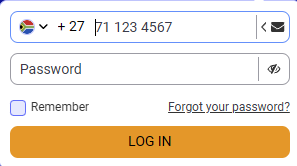
Start by opening the Paripesa homepage in your browser. Click the "Login" button in the top right corner. On the login form, look for the "Forgot password?" link below the password field. Clicking it opens the recovery page where you choose between email and phone verification.
Enter the email address or phone number associated with your account. Paripesa sends a six-digit code to that contact method. The code expires after a few minutes, so enter it promptly. Once verified, you'll create a new password. The system requires at least eight characters with mixed case and numbers. Avoid reusing your last three passwords.
Password Reset Through the Mobile App
The Paripesa mobile app follows the same recovery logic but the layout differs slightly. Open the app and tap the login button. On the login screen, the "Forgot password?" text appears below the input fields. Tapping it brings up the same choice between email and SMS verification.
One advantage of the app: if you have biometric login enabled (fingerprint or Face ID), you might still access your account even if you've forgotten the password. Check your device settings first. If biometrics work, you can change the password from within the account settings without going through the full recovery flow.
When You Don't Receive the Verification Code
This is the most common issue. First, check your spam or junk folder for email codes. For SMS, wait at least two minutes before requesting a new code — the system sometimes delays delivery during high traffic. If you're using a VoIP number or a number registered in a different country than your account, SMS delivery often fails.
- Request the code again after two minutes
- Try the alternative contact method (email if SMS failed, or vice versa)
- Ensure your phone has signal and isn't blocking unknown senders
- Check that the email address on file is still active
If neither method works after three attempts, the system may temporarily lock further requests. Wait 15 minutes before trying again. During this window, don't keep clicking the resend button — it extends the lockout.
Recovering Access Without Email or Phone
If you've lost access to both your registered email and phone number, automated recovery won't work. You'll need to contact Paripesa customer support directly. The live chat is the fastest route — agents are available 24/7. Have your account ID ready (found in old confirmation emails or screenshots) and be prepared to verify your identity.
The manual review process takes anywhere from 30 minutes to 24 hours depending on queue volume. Once verified, support can update your contact details and send a temporary password to your new email or phone. Change it immediately after logging in.
Two-Factor Authentication and Password Reset
If you enabled two-factor authentication (2FA) on your Paripesa account, the password reset process adds an extra step. After entering the email or SMS code, you'll also need the current 2FA code from your authenticator app. This prevents someone from taking over your account even if they compromise your email.
Losing access to your authenticator app creates a similar situation to losing email and phone access. You'll need to contact support and go through identity verification. They can disable 2FA on your account after confirming ownership, allowing you to set it up fresh on a new device.
Common Mistakes That Delay Recovery
Users often create their own obstacles during password reset. The most frequent error is entering the wrong email address — perhaps an old one you used during registration but no longer check. Another is requesting codes repeatedly without waiting for delivery, which triggers the temporary lockout mentioned earlier.
- Double-check the email or phone on the recovery page before submitting
- Wait the full two minutes between code requests
- Use the same browser or app session — don't switch devices mid-process
- Clear browser cache if the recovery page loads incorrectly
A less obvious issue: some password managers autofill the wrong credentials on the recovery page. If your manager fills in an old password instead of letting you create a new one, disable autofill for that page temporarily.
Security Best Practices After Reset
Once you regain access, take a few minutes to secure the account properly. Update your recovery email and phone number if they've changed. Enable 2FA if you haven't already — Google Authenticator or Authy both work. Review the login history in your account settings for any unfamiliar devices or locations.
Paripesa allows multiple active sessions across devices. If you suspect someone else had access, use the "Log out of all devices" option in security settings. This forces a fresh login everywhere with your new password.
Paripesa Account Security Features Overview
Beyond password recovery, Paripesa offers several account protection tools worth knowing. The platform supports login notifications via email or SMS whenever a new device accesses your account. You can also set withdrawal passwords — a separate PIN required for any fund transfers, adding a layer of protection even if someone obtains your main password.
Scroll horizontally to see all columns
| Feature | Purpose | Setup location |
|---|---|---|
| Two-factor authentication | Requires authenticator app code at login | Account settings > Security |
| Withdrawal password | Separate PIN for fund transfers | Account settings > Security |
| Login notifications | Alerts for new device logins | Account settings > Notifications |
| Session management | View and revoke active sessions | Account settings > Security |
Troubleshooting Specific Error Messages
The recovery page displays a few distinct error messages. "Invalid code" means the code expired or was entered incorrectly — request a new one. "Account not found" suggests you're using an email or phone not linked to any Paripesa account. "Too many requests" indicates the temporary lockout; wait 15 minutes.
A less common error: "Technical error, try again later." This usually means Paripesa's email or SMS gateway is experiencing issues. It typically resolves within an hour. If urgent, contact support via live chat and mention the specific error — they can sometimes trigger a manual reset from their side.
When to Contact Support Directly
Don't waste time on automated recovery if: you no longer control the registered email or phone, you're getting persistent technical errors, your account shows signs of unauthorized access (unknown bets, changed settings), or you need to update your registered contact information without access to the old ones.
- Live chat: fastest response, available 24/7
- Email support: slower but creates a ticket trail
- Phone callback: request via live chat if available in your region
- Telegram bot: Paripesa operates an official support bot
When contacting support, provide your account ID, the email or phone you're trying to recover, and a clear description of what's not working. Screenshots of error messages help agents diagnose faster. Be ready with identification documents — they'll ask for them.
Preventing Future Lockouts
The best password reset is the one you never need. Use a password manager to generate and store unique credentials for Paripesa. Bitwarden, 1Password, or your browser's built-in manager all work. Enable 2FA — it's the single most effective protection against account takeover. Keep your registered email and phone current; update them in account settings whenever they change.
A password manager eliminates the need to remember complex passwords while ensuring each site gets a unique one. The recovery process becomes irrelevant because you never forget the master password.
Consider setting a withdrawal password even if you don't plan to withdraw frequently. It's a small friction that pays off if your main credentials are ever compromised. The PIN is separate from your login password and required for any outgoing transaction.
Final Assessment of Paripesa Password Reset
Paripesa's password recovery system works reliably for the majority of users who still control their registered contact methods. The email and SMS flows are standard, the codes arrive quickly, and the new password requirements are reasonable. The mobile app mirrors the web experience well. Problems arise mainly when contact information is outdated or when 2FA is enabled without a backup plan for the authenticator app. Support is responsive but requires identity verification that takes time. Keep your recovery details current, enable 2FA, and use a password manager — those three habits prevent almost every lockout scenario.
Frequently Asked Questions
How long does the Paripesa password reset code remain valid?
The verification code expires after approximately 5 minutes. Enter it promptly or request a new one.
Can I reset my Paripesa password without access to my email or phone?
No, automated recovery requires access to at least one registered contact method. Without both, you must contact customer support and complete identity verification.
What are the password requirements for Paripesa?
Minimum 8 characters with at least one uppercase letter, one lowercase letter, and one number. Special characters are optional.
Why am I not receiving the SMS verification code from Paripesa?
Common causes include poor signal, carrier filtering, VoIP numbers, or country mismatch. Wait 2 minutes, ensure your phone can receive international SMS, then try again or use email instead.
Does Paripesa support two-factor authentication?
Yes, Paripesa supports TOTP-based 2FA through apps like Google Authenticator or Authy. Enable it in Account Settings > Security.
What should I do if I lost access to my authenticator app?
Contact Paripesa support via live chat. After identity verification, they can disable 2FA on your account so you can set it up on a new device.
How many times can I request a password reset code before being locked out?
After approximately 3 failed attempts or rapid requests, the system imposes a 15-minute lockout. Wait before trying again.
Can I use the same password I used previously on Paripesa?
The system prevents reusing your last 3 passwords. Choose a new one that meets the complexity requirements.