

Betting Guides
Paripesa Personal Account: Complete Guide to Your Dashboard
Everything you need to know about managing your Paripesa account effectively

Sports Betting Analyst & Football Predictions Expert
Brian Otieno is a Kenyan sports betting analyst with over 10 years of experience in football predictions, match analysis, and betting strategies. He specializes in European football leagues, statistical analysis, odds comparison, and identifying value betting opportunities. His approach combines data-driven insights, team performance research, and disciplined bankroll management to help sports enthusiasts make more informed betting decisions.
The Paripesa personal account serves as the central hub for every betting and casino activity on the platform. Whether you placed your first wager five minutes ago or have been active for years, the dashboard controls how you deposit, withdraw, track bets, claim bonuses, and protect your data. Understanding each section saves time and prevents common mistakes that lead to locked funds or missed promotions.
Contents
- 1. Getting Started with Your Paripesa Account
- 2. Account Registration and First Login
- 3. Navigating the Personal Dashboard
- 4. Profile Settings and Personal Information
- 5. Account Verification and KYC Process
- 6. Security Features and Two-Factor Authentication
- 7. Deposit and Withdrawal Management
- 8. Betting History and Transaction Records
- 9. Bonus Management and Promo Codes
- 10. Mobile App Account Features
- 11. Responsible Gambling Tools
- 12. Customer Support Access from Your Account
- 13. Common Account Issues and Fixes
- 14. Final Assessment of Paripesa Personal Account
This guide walks through every meaningful area of the account interface. It covers registration, verification, security settings, payment management, betting history, bonus tracking, and the tools Paripesa provides for responsible gambling. The goal is to give you a practical reference you can return to whenever something feels unclear.
Getting Started with Your Paripesa Account
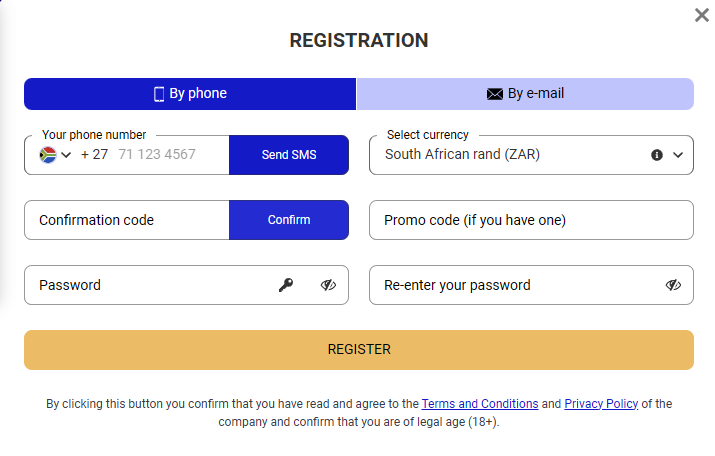
Before the personal account exists, you need to register. Paripesa offers several signup methods: one-click, by phone, by email, or through social networks and messengers. The one-click option creates an account instantly with a generated login and password, but it leaves critical fields empty. You will need to complete the profile later to unlock withdrawals and bonuses.
Phone and email registration ask for more details upfront — country, currency, and a password you choose. Social network signup pulls basic data from the selected platform. Whichever method you pick, the system assigns a unique account ID. Save it. Support agents ask for this ID whenever you contact them about payments, verification, or technical issues.
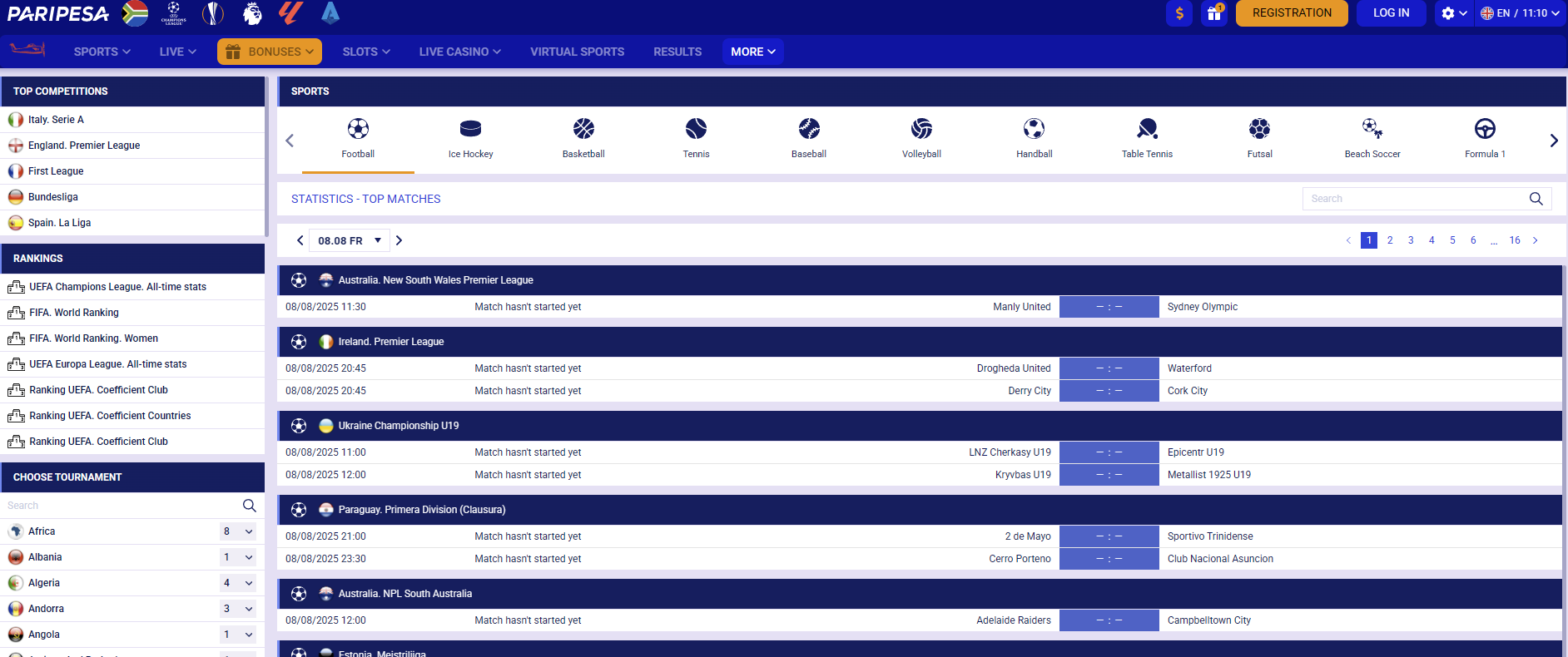
After registration, the first login brings you to the main dashboard. The layout follows a standard pattern: a left sidebar with navigation links, a top bar showing balance and quick actions, and a central area that changes based on the selected menu item. The sidebar groups items into Account, Bonuses, History, and Settings. Familiarize yourself with these groups early; they remain consistent across desktop and mobile.
Account Registration and First Login
The registration form validates each field in real time. Phone numbers must include the country code. Email addresses receive a verification link. Passwords require at least eight characters with mixed case and numbers. If you use the one-click method, the system generates a complex password. Copy it immediately or use the "Save as file" option. Losing this password before you set a memorable one means going through recovery.
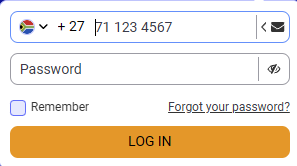
First login on desktop redirects to the account completion page. The platform prompts for full name, date of birth, and address. These fields are mandatory for KYC. You can skip them temporarily, but withdrawals will stay blocked until the profile is complete. The same page lets you set a security question and enable two-factor authentication. Doing both now avoids extra steps later.
Mobile users see a slightly condensed version. The hamburger menu replaces the left sidebar. All account sections remain accessible, but some tables collapse into cards. The mobile app mirrors the mobile website layout, so switching between them feels seamless. If you prefer the app, download the APK for Android or use the App Store link for iOS. Both versions support biometric login after the first manual entry.
Navigating the Personal Dashboard
The dashboard opens on the "My Account" overview. This screen shows current balance, bonus balance, and a summary of recent activity. Three tabs sit at the top: Main, Bonus, and Promo Code. The Main tab displays real money balance and available payment methods. The Bonus tab lists active promotions with wagering progress bars. The Promo Code tab lets you enter codes from the Paripesa promo store or partner sites.
Below the balance cards, a quick-action row offers Deposit, Withdrawal, and Bet History buttons. These shortcuts jump directly to the corresponding sections. The left sidebar expands on hover or tap. Key sections include Personal Profile, Security, Betting History, Transaction History, Bonuses and Gifts, Promo Code Store, and Settings. Each section loads in the central pane without a full page refresh, which keeps navigation fast.
The top right corner holds the user menu. Clicking your username reveals Profile, Settings, Logout, and a link to the full website version if you are on mobile. A notification bell icon appears when the platform sends system messages — bonus credits, verification updates, or maintenance notices. Unread counts show on the bell. Dismissing notifications does not delete them; they remain in the Messages section under Settings.
Profile Settings and Personal Information
The Personal Profile page splits into several tabs: Personal Data, Contact Details, Documents, and Preferences. Personal Data holds your legal name, date of birth, and gender. These fields lock after verification. If you need to change a name due to marriage or legal reasons, contact support with scanned documents. Contact Details stores phone, email, and residential address. The phone and email each have a verification status badge. Green means verified; yellow means pending; red means failed or expired.
The Documents tab is where you upload KYC files. Paripesa typically requests a government-issued ID (passport, driver's license, or national ID) and a proof of address (utility bill or bank statement no older than three months). Some regions also ask for a selfie with the ID. File size limit is 8 MB per document. Accepted formats: JPG, PNG, PDF. Uploads go to a manual review queue. Approval usually takes a few hours but can extend to 48 hours during peak periods.
Preferences control odds format (decimal, fractional, American, Hong Kong, Indonesian, Malay), time zone, and language. The platform supports over 50 languages. Changing the language reloads the interface instantly. Time zone affects bet settlement timestamps and bonus expiry displays. Set it to your local zone to avoid confusion when checking when a free bet expires.
Account Verification and KYC Process
Verification is not optional for real-money withdrawals. Paripesa follows standard anti-money-laundering rules. The process has two levels. Level 1 requires a valid ID document and a selfie. Level 2 adds proof of address and sometimes a source-of-funds declaration for large transactions. Most users only need Level 1. High-volume players or those hitting certain deposit thresholds get prompted for Level 2 automatically.
Start verification from the Documents tab. Click "Upload" next to each required document type. The system checks file format and size before accepting. After submission, status changes to "Under Review." You receive a notification when the review finishes. If rejected, the notification includes a reason — blurry image, expired document, mismatched data. Fix the issue and re-upload. There is no limit on attempts.
Some countries require additional steps. For example, Indian users may need to verify via Aadhaar or PAN card. Brazilian users often provide CPF. The platform adjusts the document list based on the country selected during registration. If you move countries, update your residence in Contact Details and re-verify with local documents. The old verification does not transfer automatically.
Scroll horizontally to see all columns
| Document Type | Accepted Examples | Validity Rules |
|---|---|---|
| Identity | Passport, Driver's License, National ID | Must be valid, not expired |
| Address Proof | Utility Bill, Bank Statement, Tax Letter | Issued within 3 months |
| Selfie | Photo holding ID next to face | Clear, all text readable |
| Source of Funds | Payslip, Business Revenue, Crypto Wallet | Required for large deposits only |
Security Features and Two-Factor Authentication
The Security page offers three protection layers: password management, two-factor authentication (2FA), and login history. Password change requires the current password and a new one meeting complexity rules. The platform does not enforce periodic rotation, but changing every few months is a good habit. The "Logout from all devices" button revokes every active session instantly — useful if you suspect unauthorized access.
2FA supports Google Authenticator, Authy, and SMS codes. Authenticator apps are more secure than SMS because they avoid SIM-swap risks. To enable, scan the QR code with your app, enter the generated six-digit code, and confirm. After activation, every login asks for the 2FA code. The platform also offers a "Trusted Devices" list. Checking "Remember this device for 30 days" skips 2FA on that browser or app. Review the list monthly and remove devices you no longer use.
Login history shows the last 50 sessions with IP address, device type, browser, location, and timestamp. Suspicious entries — unknown locations, odd hours — should trigger an immediate password change and a support ticket. The platform does not send automatic alerts for new logins, so checking this page periodically is the only way to spot unauthorized access.
Deposit and Withdrawal Management
The Deposit page lists every payment method available in your country. Methods group into bank cards, e-wallets, mobile payments, bank transfers, and cryptocurrencies. Each method shows minimum and maximum limits, processing time, and any fees. Paripesa does not charge deposit fees, but some payment providers do. The page remembers your last used method and pins it to the top for quick access.
Deposits are usually instant. Bank transfers and some crypto networks take longer — up to a few hours for blockchain confirmations. If a deposit does not appear within the stated time, check the Transaction History page. Pending deposits show with a spinning icon. Do not attempt a second deposit for the same amount until the first resolves; duplicate payments create reconciliation delays.
Withdrawals use the same methods where possible. The platform enforces a closed-loop policy: you must withdraw to a method you have previously used for deposits. If you deposited via UPI, you withdraw via UPI. If you used multiple methods, you can choose among them. First withdrawal on a new method triggers a manual review. Subsequent withdrawals to the same method often process automatically.
Scroll horizontally to see all columns
| Method Type | Min Withdrawal | Max Per Transaction | Typical Processing |
|---|---|---|---|
| E-wallets (Skrill, Neteller, etc.) | 1.50 EUR | 10,000 EUR | 15 minutes to 1 hour |
| Bank Cards (Visa, Mastercard) | 5 EUR | 5,000 EUR | 1 to 3 business days |
| Bank Transfer | 10 EUR | 50,000 EUR | 1 to 5 business days |
| Cryptocurrencies | Equivalent of 10 EUR | No fixed limit | Up to 1 hour after approval |
| Mobile Payments (UPI, Paytm, M-Pesa) | Equivalent of 1 EUR | Varies by provider | Instant to 30 minutes |
Withdrawal limits reset daily, weekly, and monthly. VIP levels raise these limits. The exact numbers appear in the Withdrawal page footer. If you need a higher one-time limit, contact support with a reason. They may ask for additional verification. Cryptocurrency withdrawals require the correct network selection (ERC-20, TRC-20, BEP-20, etc.). Sending to the wrong network loses funds permanently. Double-check the address and network before confirming.
Betting History and Transaction Records
The Betting History section splits into Sports, Live, Casino, and Virtual tabs. Each tab shows a filterable table: date range, bet status (settled, pending, void), bet type (single, accumulator, system), and sport or game. Clicking a bet ID opens a detailed view with odds, stake, potential return, and settlement timestamp. The detailed view also shows the bet slip as it looked at placement time, which helps resolve disputes.
Transaction History covers all money movements: deposits, withdrawals, bonus credits, bonus deductions, cashback, and internal transfers between main and bonus balances. Each row shows date, type, amount, currency, status, and a reference ID. Export buttons at the top allow CSV or Excel download for the selected date range. Exports include up to 10,000 rows. For larger datasets, request a statement from support.
The platform retains full history for the life of the account. Closed bets do not disappear. This is useful for tax reporting or personal analysis. Some users build spreadsheets from the exported data to track ROI by sport, bet type, or time of day. The data includes enough detail to reconstruct any bet slip without screenshots.
A complete betting history is the most underused tool for improving results. Most players never review it.
Bonus Management and Promo Codes
The Bonuses and Gifts page lists every promotion tied to your account. Active bonuses show wagering progress as a percentage bar. Hovering the bar reveals exact numbers: wagered amount, remaining amount, and expiry date. Completed bonuses move to a history tab. Expired bonuses show as "Failed" with the reason — usually unmet wagering or missed deadline.
Each bonus has terms accessible via an "i" icon. Read them. Key terms include minimum odds for sports bonuses, eligible games for casino bonuses, maximum bet size while wagering, and whether the bonus is sticky (non-withdrawable) or convertible. Sticky bonuses deduct the bonus amount from winnings at withdrawal. Convertible bonuses transfer the remaining bonus balance to real money after wagering finishes.
The Promo Code Store lets you exchange bonus points for free bets, free spins, or cash bonuses. Points accumulate from real-money bets. The store refreshes weekly. Some codes are region-specific. Entering a code from an affiliate site works the same way — paste it in the Promo Code tab on the main dashboard. Invalid or expired codes show an error immediately. Valid codes credit instantly.
Mobile App Account Features
The Paripesa mobile app replicates the desktop account structure. The bottom navigation bar replaces the left sidebar with five icons: Home, Live, Casino, Coupon, and Menu. The Menu icon opens the full account drawer. All settings, verification, history, and security pages work identically. The app adds push notifications for bet settlement, bonus credits, and promotional offers. Enable them in the app settings if you want real-time updates without checking email.
Biometric login (fingerprint or Face ID) activates after the first successful password and 2FA entry. The app stores an encrypted token, not the password itself. If you change your password on desktop, the app prompts for the new password on next launch, then re-enables biometrics. Logging out from the app does not log out other sessions. Use the "Logout from all devices" button on the Security page for a full reset.
The mobile website works as a fallback if you cannot install the app. It loads faster on older devices and does not require updates. However, it lacks push notifications and biometric login. Some browsers offer to save passwords, which partially compensates. The mobile site also supports "Add to Home Screen" on both Android and iOS, creating an app-like icon that opens the site in a standalone window.
Responsible Gambling Tools
Paripesa includes a Responsible Gambling section under Settings. It offers deposit limits (daily, weekly, monthly), loss limits, wager limits, session time limits, and a reality check timer that pops up at a chosen interval. Limits apply immediately when set. Increasing a limit requires a 24-hour cooling period. Decreasing takes effect instantly. This asymmetry prevents impulsive limit raises during a session.
Self-exclusion options range from 24 hours to permanent account closure. Temporary exclusions block login and marketing emails. Permanent closure deletes personal data after regulatory retention periods. During any exclusion, you cannot create a new account with the same details. The platform shares exclusion data with partner brands on the same network, so a self-exclusion on Paripesa may block registration on sister sites.
The page also links to external help organizations: GamCare, Gambling Therapy, Gamblers Anonymous, and local helplines for supported countries. A self-assessment questionnaire helps identify risky patterns. Results are private and not stored on the server. If the questionnaire suggests high risk, the platform recommends immediate limit setting or self-exclusion.
Customer Support Access from Your Account
The support link in the user menu opens a live chat widget. The chatbot handles common questions — bonus terms, payment methods, verification status — without human operators. If the bot cannot resolve the issue, it transfers to an agent. Average wait time is under five minutes during peak hours. Agents can see your account details, recent transactions, and verification status, so you rarely need to repeat information.
Email support is available for complex disputes requiring documentation. The contact form pre-fills your account ID and registered email. Attach screenshots or PDFs directly. Response time is usually within 24 hours. Phone support is not offered. The platform also maintains a Telegram channel and a Twitter account for announcements, but they do not handle individual account issues.
Before contacting support, check the FAQ section in the help center. It covers password recovery, missing deposits, bonus wagering, verification delays, and bet settlement rules. Many tickets close with a link to the relevant FAQ article. Reading it first saves time for both sides.
Common Account Issues and Fixes
Forgotten password is the most frequent issue. The reset link expires in one hour. Check spam folder if the email does not arrive. If you no longer have access to the registered email, contact support with your account ID and a photo of your ID document. They can update the email after manual verification. The same process applies to lost phone numbers.
Deposit not credited usually means the payment provider has not sent the confirmation callback. Wait the maximum processing time shown on the Deposit page. If it passes, open a chat with the transaction ID (from your bank or wallet) ready. Agents can trace the payment manually. Do not deposit again while the first is pending.
Withdrawal rejected often stems from mismatched names, unverified payment method, or bonus funds still in the balance. The rejection notification includes a code. Common codes: KYC_INCOMPLETE, BONUS_ACTIVE, METHOD_MISMATCH, LIMIT_EXCEEDED. Fix the root cause and request again. Repeated requests without fixes get flagged for manual review, adding days to the timeline.
Bet settled incorrectly happens rarely. If you believe a settlement error occurred, take a screenshot of the bet slip and the official result source (league website, TV broadcast timestamp). Send both to support. They escalate to the trading team. Corrections, when warranted, process within 48 hours. The corrected amount appears as a separate transaction in history.
Frequently Asked Questions
How do I find my Paripesa account ID?
Your account ID appears in the top right corner of the dashboard next to your username. It also shows in the Personal Profile tab and in every email from Paripesa support.
Can I change the currency of my account after registration?
No. Currency is locked at registration. To use a different currency, you must close the current account and open a new one with the desired currency.
Why is my withdrawal still pending after 24 hours?
First withdrawals to a new method undergo manual review. High amounts may trigger additional checks. Weekends and holidays can add delay. Check the Transaction History for status updates.
What happens to my bonus if I withdraw before wagering is complete?
The bonus and any winnings derived from it are forfeited. Only the real-money balance remains withdrawable. The bonus progress bar resets to zero.
How do I enable two-factor authentication on Paripesa?
Go to Security in the account menu, choose Two-Factor Authentication, scan the QR code with Google Authenticator or Authy, enter the six-digit code, and confirm. Save the backup codes shown after activation.
Can I have multiple Paripesa accounts?
No. The terms allow one account per person. Duplicate accounts are detected during verification and closed. Funds in duplicate accounts may be confiscated.
Where do I see my VIP level and cashback percentage?
Open the VIP Club section from the left sidebar or the Bonuses page. Your current level, progress to the next level, and cashback rate display at the top.
Final Assessment of Paripesa Personal Account
The Paripesa personal account covers every function a bettor or casino player needs. Registration is flexible, the dashboard is logically organized, and the range of payment methods accommodates most regions. Verification follows industry standards without excessive friction. Security tools — especially authenticator-based 2FA and login history — are solid if you actually use them. Bonus tracking is transparent with clear progress bars and accessible terms.
Weak points exist. The platform does not send login alerts by default, so you must check history manually. Withdrawal limits for non-VIP users are modest compared to some competitors. The closed-loop withdrawal policy, while standard, can frustrate players who deposit via one method and prefer to cash out via another. Mobile push notifications only work through the app, not the mobile site. And the responsible gambling tools, while present, lack a mandatory cooling-off prompt after large losses.
For most users, the account works well once set up correctly. Complete your profile early, enable 2FA, verify your documents before the first withdrawal, and read bonus terms before opting in. Those four habits prevent 90 percent of the issues that generate support tickets. The interface rewards exploration — spend ten minutes clicking every tab once, and you will rarely feel lost afterward.